Changelog - January 2026

Changelog

February 2, 2026

Introducing Agent Mode in the Coding Assistant

January 2026 marks a significant milestone for Codespell with the launch of Agent Mode in the Coding Assistant. This enhancement strengthens Codespell’s role as an AI-powered SDLC copilot by moving beyond reactive assistance to structured, goal-driven execution.

What’s New: Agent Mode

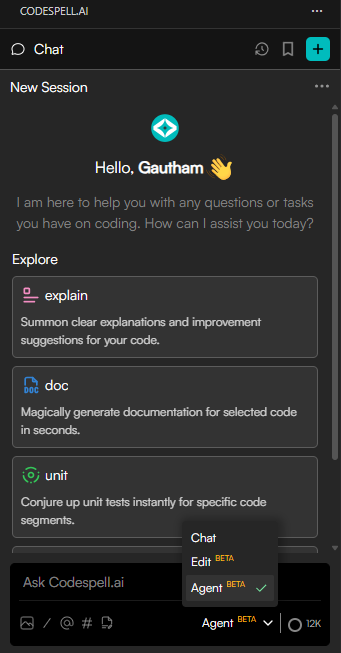
Agent Mode enables the Coding Assistant to operate with greater autonomy while maintaining developer control. Instead of responding only to individual prompts, the assistant can now:

  • Plan tasks end-to-end by understanding the overall objective
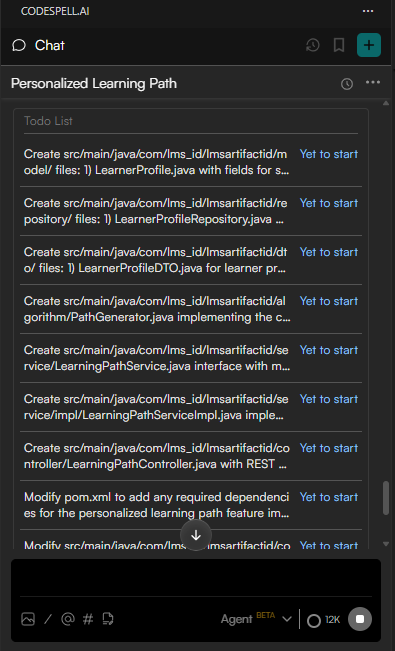
  • Generate a structured TODO list outlining the required steps
  • Request explicit approval before initiating execution, ensuring governance and control

Once approval is granted, the assistant can autonomously execute tasks across the workspace, including:

  • Creating new files
  • Reading and editing existing files
  • Searching codebases using Grep and Glob operations
  • Making coordinated, end-to-end updates across multiple files

This workflow ensures that changes are intentional, traceable, and aligned with developer expectations.
Why This Matters

Agent Mode significantly reduces manual effort in repetitive and multi-step development tasks. By combining planning, approval, and execution into a single intelligent flow, teams can:
  • Accelerate development cycles
  • Maintain consistency across codebases
  • Reduce context switching for developers
  • Improve overall productivity without compromising control
Looking Ahead

Agent Mode is a foundational step toward deeper automation across the software development lifecycle. Future updates will continue to expand intelligent orchestration capabilities while keeping transparency, quality, and developer trust at the core.

Stay tuned for more updates as Codespell continues to evolve as a complete AI SDLC copilot.

Table of Contents

    Frequently Asked Questions

    1. What is Agent Mode in Codespell?
    Agent Mode is an enhanced operating mode within the Codespell Coding Assistant that enables task planning and autonomous execution. It allows the assistant to break down a request into actionable steps, seek approval, and then perform end-to-end code changes across the workspace.
    2. Does Agent Mode execute changes without developer approval?
    No. Agent Mode always generates a structured plan and TODO list first and explicitly requests user approval before executing any action. This ensures full transparency, governance, and developer control.
    3. What actions can Agent Mode perform?
    Once approved, Agent Mode can create, read, edit, and search files using Grep and Glob operations. It can also create new files and update existing ones across multiple parts of the codebase as part of a single workflow.
    4. How is Agent Mode different from the standard Coding Assistant?
    The standard Coding Assistant responds to individual prompts and code-level queries. Agent Mode, on the other hand, operates at a task level, enabling planning, coordination, and autonomous execution of multi-step development activities.
    5. Who benefits the most from using Agent Mode?
    Agent Mode is especially beneficial for developers and engineering teams working on complex or repetitive tasks, such as feature implementation, refactoring, or project setup, where structured planning and consistent execution can significantly improve productivity.
    Blog Author Image

    Market researcher at Codespell, uncovering insights at the intersection of product, users, and market trends. Sharing perspectives on research-driven strategy, SaaS growth, and what’s shaping the future of tech.

    Don’t Miss Out
    We share cool stuff about coding, AI, and making dev life easier.
    Hop on the list - we’ll keep it chill.